Introduction to Excel Formulas and Functions

At first, new Excel users only do basic data entry. Let’s explore Excel’s core Formulas and Functions. These are the basic tools that allow you to perform calculations that can turn basic data entry into useful information and valuable insights. This post breaks down the ultimate formulas and functions you should know. Don’t worry we’ll keep it simple with practical easy to learn examples with clear explanation.

Basic Excel Formulas

Formulas are a fundamental component of Excel, Basic calculations can be performed using arithmetic operators such as Addition (+), Subtraction (-), Multiplication (*), Division (/) and Percentage (%). Let’s learn how to use these operators to perform basic calculations.

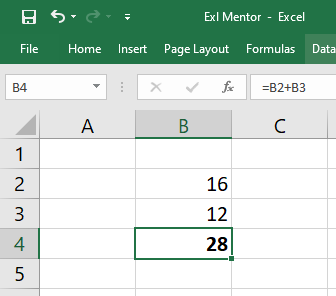
Addition (+)

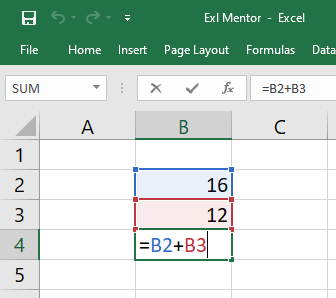
Addition Formula - Exl Mentor
Addition Formula Result
=B2 B3

(+) Plus sign is used to add numbers, make totals, and calculations.

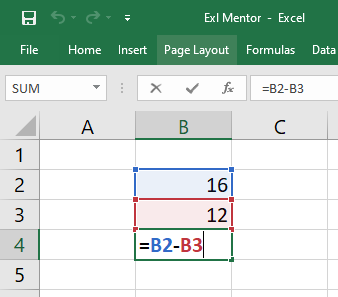
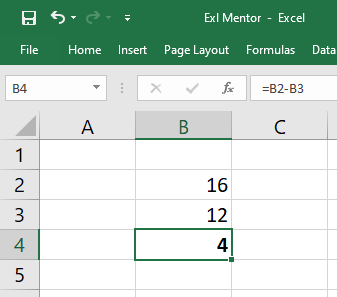
Substraction (-)

Subtraction Formula - Exl Mentor
Subtraction Formula Result - Exl Mentor
=B2 B3

(-) Minus sign is used to subtract numbers and is common for expense calculations and profit analysis.

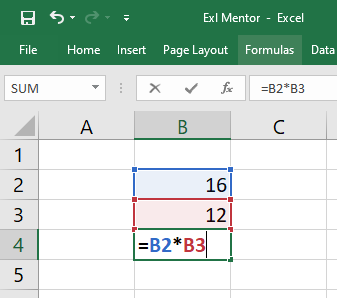
Multiplication (*)

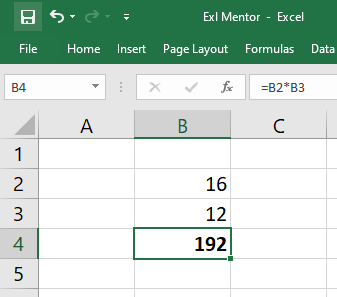
Multiplication Formula - Exl Mentor
Multiplication Formula Result - Exl Mentor
=B2 B3

(*) Asterisk sign is used to multiply numbers, pricing, quantities, interest, and tax calculations.

Division (/)

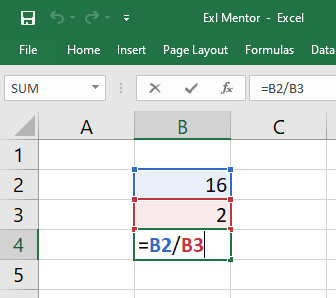
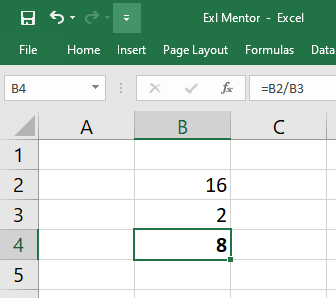
Division Formula - Exl Mentor
=B2 B3

(/) Forward Slash sign is used to divide numbers and helpful for ratios, averages, and percentage calculations

Basic Excel Functions

Excel functions are built-in formulas that help you perform calculations quickly and accurately without writing complex formulas. These functions are widely used in daily office work, accounting, and data analysis. 

Learning essential Excel functions like SUM, AVERAGE, MIN, and MAX will help beginners work smarter and save time.

Leave a Comment

Your email address will not be published. Required fields are marked *

Scroll to Top